Showing posts with label Mavericks. Show all posts

Thursday, July 4, 2013

OS X Mavericks 10.9. It's Finally Time To Upgrade

OS X Mavericks is the biggest thing to happen to OS X since the debut of OS X.  I've been using it as my primary OS for the past week and even though it is still in beta, it is totally stable and performs extremely well.

If OS X Lion and Mountain Lion seemed to be incremental and updated for the sake of updating, OS X Mavericks 10.9 is THE update to get!  Everything just flows together, works well and has been tweaked and efficiency has been pushed to the max.  Less thrashing of the hard drive, Compressed Memory, App Nap, Safari and Finder Tabs are the highlights of this operating system.  Everything has been fine tuned to such an extent that it just seems perfect.  (I'd been always wondering why Apple doesn't put the unused apps to sleep to save RAM and energy, and Apple has done it!  I also really wished for a bigger iPhone after squinting to read on my iPhone and Apple did that too, and made the iPad....Apple seems to have habit of thinking before most people do and provide them the facilities...Maybe that's why there are so many iSheep...me included  :)    )

It is equivalent or even more monumental than Windows XP or 7 were to the Windows operating system.  It doesn't seem like it on the surface, but it is a landmark operating system.  If you have been holding off upgrading till now (and like me downgraded back to Snow Leopard for it's efficiency), it's finally the right time to upgrade....

Tuesday, July 2, 2013

Why I’m Using A White Unibody Macbook (2009) in 2013?


  1. I just like white Apple Laptops better.  The unibody aluminum models remind me too much of PC laptops
  2. It’s repairable.  If a hard drive goes Kaput, the laptop can be opened and a new one can be installed without a hitch.  Newer MacBooks seem to get harder and harder to repair and the Retina MacBook Pro, lovely as it is, has everything so glued together that I think even the Apple technicians will get nightmares trying to repair it.
  3. It’s upgradable - I’ve already upgraded the memory to 4GB and plan to add another 4GB soon, for a total of 8GB, which should make the laptop scream even more.  I can just leave all my apps open for an “instant on” setup. I don’t think I’ll need to add the SSD (but I can if I want to) 
  4. The Core 2 Duo 2.26gHz processor is quite adequate for the web browsing, document editing, and general day to day usage that I do.  The nVidia 9400m graphics card is also adequate for the few less demanding games I play.
  5. It still runs the latest Mac OS X 10.9 Mavericks pretty damn well with 4GB of RAM.
  6. The battery still holds 91 to 92% charge, has reached about 170 cycles (out of 1000 recommended by Apple) so I guess it is going to last for a few more years.  The battery lasts for over 5 hours for most routine work.
  7. It’s solidly built, there is minimal flexing, and the screen hinges are fantastic.
  8. It's very quiet and I can hardly hear the fans.  During heavy workload, however, it can get loud and the underside of the laptop can get pretty warm...
  9. The touch pad is the best I’ve ever ever used and the cursor doesn’t keep moving around when I touch the touchpad by mistake while I’m typing (a big BIG problem with most Windows laptops)
  10. The screen is only mildly reflective and shows good colors.
  11. THE SLEEP MODE

The sleep mode is fantastic in Macbooks.  After you close the lid, it goes into sleep mode with blinking LED lights (which are supposed to last for about 20,000 hours so no need to worry seeing them blink).  It loses about 10% charge per day which means it would probably last 10 days in sleep mode.  I know this is kind of available in Windows as well, but it doesn’t last so many days.

Another great thing about the sleep mode is that if I join the display port adapter to an external monitor, I don’t need to open the laptop to wake it up; I can just use an external keyboard and use the laptop closed, like a Mac mini / desktop.  This is the setup I use at home...On my PC laptops, I'd have to open the screen, wake up the laptop, then close the screen back down and use the external monitor....


Sure I’m going to miss out on the latest processors and architecture, but the laptop is more than adequate for my uses.  Here’s to a few more happy years with my laptop!!!

Saturday, June 29, 2013

Battery Life in OS X Mavericks 10.9

Battery life in OS X Mavericks 10.9 seems to have improved a bit.  I haven’t really done any specific testing as such, but overall, the battery life seems to have improved under general usage.

With Snow Leopard, I’d get close to 4:30 - 5:00 hours with my Macbook White.  Now, with Mavericks, it’s more like 5:00 to 6:00 hours.  So let’s say, roughly about 1 hour more than Snow Leopard.  That’s really very good, amount for roughly a 20% increase in battery life.

This may also be due to my CPU being an old Core 2 Duo, p8400 2.26 ghz.  Maybe, the newer CPUs like Haswell have better power savings, and may lead to an increase in battery life.

This is with Wifi On and Safari running in the background. 


I'm sure Apple is going to further optimise the battery life as it gets closer to the final release, but I'm already really happy with the results, so anything more will be just additional bonus.

Whatever the case, kudos to Apple for increasing the features, overall speed and even battery life, all in one masterful stroke!

Thursday, June 27, 2013

OS X 10.9 Mavericks Compressed Memory: A more detailed analysis

I tested OS X Mavericks more extensively over the last couple of days.  The Activity Monitor was always on (it has some wonderful new changes, by the way) and I was monitoring the changes.

I started loading a lot of apps so that I could overload the system and get the swap file to start slowing down the system.  But no...Nothing happened even after I loaded the heavyweights Chrome, Safari, and iPhoto.

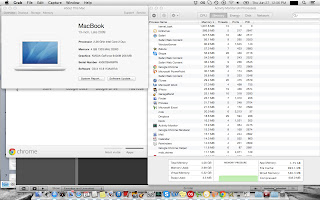
So I went crazy and started opening up all the apps I had installed but the swap file refused to budge!  Compressed Memory apparently had started to come into play, and I could see its values start to rise.  Even after I had opened up all my apps, run a system scan with iAntivirus, playing iTunes in the background, and over 5GB of virtual memory used, the swap file was still ZERO.  Frigging Zero!!!!  Sure, the system was kind of bogged down, but I have never ever seen any OS with such fantastic memory management.  If it was Lion, Mountain Lion, or even Snow Leopard, the swap file would have been a few GB by now, and the system would be slow as molasses with the hard drive thrashing away!


I really really don’t know how Apple has managed this remarkable feat!  Even after continuing to stress the system for some more time, the swap file finally went up to 3.5 MB!!!  That’s MB not GB mind you....Amazingly Incredible!


If you look at the other picture I have included, it also shows the programs in App Nap, and this may have contributed to the memory management.  Maybe it puts the background apps to sleep and gives memory to those apps in the foreground.  The amazing thing is that all of this seems to be happening in RAM!

But whatever the reasons, whatever processes are going on, I just can’t believe the results.  I’m simply at a loss for words....


Wednesday, June 26, 2013

Memory Compression in OS X Mavericks 10.9


O.K.  I was dying to try out the memory compression feature in OSX Mavericks.  After the first boot post installation on my Macbook 2009, memory usage was 2.4/4.0 GB so it was just a bit more than the previous instalment of Snow Leopard.

However, after the update and reboot, memory usage was 3.9GB and I kinda panicked, thinking," Lord, not again...Gonna have to downgrade back to Snow Leopard".  Someone very rightly said that "Snow Leopard is the Windows XP of Mac OSX...It simply will not die!

Another reboot later, things settled back to 2.4GB so that was good.

I opened up Safari (Still a memory hog!  Apple, do something about it, for God's sake)...Opened a lot of tabs, opened Microsoft Word, iTunes, and few Finder windows....Virtual memory usage showed 4.5 GB, and I expected the swap file to be used and the thrashing of the hard disk, but NO!  Apple's Compressed Memory was starting to work and it started going up to a few hundred megabytes.

So this is how it works.  First, the programs use up all the available RAM and when that's about to finish, Compressed Memory comes into play.  I really haven't overloaded the system with a lot more apps and intend to do so in a few days...Will post again.

Immediately, I uninstalled a program I'd been using for the last few months - FreeMemory.  A very good utility, but rendered useless due to Apple's superb memory management.

Fantastic job, Apple!!!

Tuesday, June 25, 2013

OS X Mavericks 10.9 install ; first impressions


I had to try out OSX Mavericks (Not a big fan of the name though) on my 2009 Unibody Macbook White with 4GB of RAM with normal hard drive.  I think this is the most exciting OS release for me in quite a while.

Previously, I had downgraded back to Snow Leopard after installing Lion and Mountain Lion.  The new features coupled with losses of performance weren't worth it for me.

Well, well, so far so good.  Mavericks runs like a champ.  I've just finished installing and waiting for it to download updates.  Memory usage, system responsiveness seem waaay better than Mountain Lion and almost as smooth as Snow Leopard on this old system...

I'll keep posting again in the coming week and will be looking at Compressed Memory, App Nap, and the gains in battery life....Stay tuned.