Showing posts with label Apple. Show all posts

Wednesday, October 2, 2013

iOS 7 on iPad 2

After a painless download and installation, everything worked quite well.  Animations were smooth, and I changed the background to one with stars and having a subtle parallax effect - I really like it.  (No I didn’t get any nausea as reported by many people….).  The one with the moving bubbles, I put on my lock screen as it was just too distracting.

The flat icon style is really too colourful and almost childish, but overall, it some brings a much required change and freshness to the OS.  Still no widgets, but that’s Apple I guess…

Speed-wise, it may be a tad slower than iOS 6 and some apps look too plain, especially notes, which looks quite boring and white/ yellow.  Other apps like Safari look cohesive with the system and changes seem to be for the better.

iTunes Radio is my favourite new feature.  I listen to it all the time.  It’s similar to Pandora, but hey it’s Apple and there are only a few ads.  While listening to it on my macbook, it actually syncs with Lastfm, just like the songs in my library.  Plus, you get to listen to latest releases (just listened to Justin Timberlake’s new album).  With extra features like this, I think it will definitely give it an edge over other services.

I also like the fact that apps auto-update by themselves...Yeah!  No more irritating small red icon telling you that you need to update your apps...

Why is there no weather app for iPad like the iPhone?  I don’t know why it is present only on the iPhone.  Apple needs to rectify this.  And, they should also update the weather icon, like they do on the clock icon and date.  Also, some apps don't work too well and I've had a few crash on me.  However, for an OS upgrade that supports 32bit and 64bit, I think it's reasonable to expect a few bugs and crashes..

Overall, I’m pretty happy with iOS 7.  And I'm glad that it still runs on the iPad 2.  Apple has added a lot of useful features and apps, and it’s a great start.  Some Apple made widgets would really spice up the system….Maybe that's coming in iOS 8.

Wednesday, July 10, 2013

iPad review, one year later: I Still Love My iPad


I’m Truly, Madly, Deeply in love with my iPad.  Over one year after its purchase and pretty heavy use, it still looks as good as new.  

A year ago, I spent countless hours at Best Buy stores trying to convince myself that I could do with an Android tablet (which started off at half the price of an iPad) but despite all the Samesungs, Kindles, Asuses and Acers, everything led me back to the iPad.  I must also mention my sincerest thanks to the Best Buy employees for not throwing me out after days and days of me just fiddling around with the tablets and not buying anything....before I finally bought the iPad from them, that is.... :)

Here are things I really like about the iPad 2...
  1. The build quality - Unmatched, it just feels sturdy and the overall design is gorgeous.  It’s undergone really heavy use in my house but still looks like new.  Part of the credit goes to the Snugg case which provides very good protection all around the tablet....
  2. The screen is excellent!  Great viewing angles, good brightness and colours.  I just wish they could turn down the reflections a bit.
  3. It’s simple to use, even my kids use it without any problems.  It’s also got a lot of good software for kids like drawing, painting, storybooks, movies and also games.
  4. It doesn’t hang.  I have never had to reset the iPad due to some misbehaving program, only close the app.  (On my Android phone, I have to reset it once in a while because it just doesn’t respond)
  5. Multitouch gestures - I especially love the four finger swipe to change between apps!  It’s just like turning pages, except you are actually “turning" apps..
  6. I can use it for work as well thanks to iWork, Dropbox and also read my PDFs.
  7. My wife has stopped using our desktop and uses the iPad exclusively...
  8. The battery supposedly can be charged about 1000 times.  On the average, I charge every 3 days, so that means 3000 days of use (That’s over 8 years of usage provided that other components don’t fail!!!)
  9. Great for looking at photos (from iCloud and Dropbox) and movies and videos.
  10. Instant on! Easy to pick up, so the laptop gets used only when heavy typing or multitasking needs to be done.
  11. It downloads programs and updates even when when it’s screen is turned off and it is asleep.  So you can download a game or updates overnight and have it ready in the morning, without much battery loss...This has been incorporated into newer Macs as Power Nap...
  12. Stable and secure.  I feel very unsafe with some Android apps and wonder whether the Google Play store regulates some of these apps.  Do you read the terms and conditions on some of the Android apps??  Man, it seems that they’re going to steal and use all my personal information...I’d rather have a closed system tightly regulated by Apple to make sure the apps I download won’t steal my credit card number!!!
  13. Sure, it’s a giant iPhone, but that’s the beauty of it.  Try reading multiple documents and PDFs on an iPhone and you’ll end up getting a migraine.  On an iPad, it’s just fine...
  14. It started off as being an unnecessary luxury but now it has become an indispensable device for all of us.  My wife says I love the iPad more than her....I say, “Better the iPad than another woman"

Retina resolution is well and good, but I really don’t need it at the distance I read and it’s kind of overkill for such a small screen which doesn’t put two windows side by side....

In the end, let me rephrase my title.  We all love the iPad!  At least, my iFamily in my iHouse...

Saturday, July 6, 2013

On Being an iSheep...


I’m proud to be an iSheep.  There, I said it, loud and clear!  And I’m sure there are millions of people like me all around the world..

But I’m not an iSheep because Apple brings out a new product and says it’s good for me.  I’m an iSheep because I’ve TRIED OUT other alternatives, and realized that this is the best device/ software for me.  Everything from the design to the hardware and software is admirable, and that is why I’m such a Rabid Fan of Apple.  Are the products perfect?  No!  But they’re the closest things to ideal of all the different products I’ve tried...

Let’s start with the design.  Whether you are a fAndroid or Windows fan, you have to give Apple credit for their terrific design sense.  Why else would so many manufacturers (Barring probably Sony and Lenovo) copy, or should I say clone, Apple’s designs, whether they are desktops, laptops, phones or software?...Yes, I’m looking at you, Samesung...Sure, your products are great, but you ain’t winning any awards for innovative design, because you really actually stole design plans from Apple while you were manufacturing chips for them, you backstabbers, bite-the-hand-that-feeds-ers!!!

The Apple tax is another myth these days.  Yes, sure, Apple products are somewhat more expensive initially, but the overall value for money and longetivity are simply unmatched.  My wife’s iPod Shuffle has been used regularly for the past seven years and it SIMPLY WON’T DIE!  And these days, even the prices  for Apple tablets, computers and phones seem comparable to similar specced Windows or Android products. 

The software, I’ve already discussed at length in my previous posts, both the OS X side and the iOS side.  What helps in binding these two operating systems is iCloud which seems clunky at first (and Apple does need to work on it more) but as I use my iPad and Macbook together, it helps maintain a sense of cohesiveness between the two operating system and makes it feel as one.  The whole ecosystem is beginning to gel together very well.  And with the implementation of iWork on iCloud, Apple has finally got a product which will compete very well with Google Docs and Microsoft SkyDrive Office... High time!  Also, I can’t wait to try iTunes Radio as well.  A complete ecosystem..

THANK YOU APPLE, Thank you Steve Jobs, Johnny Ive, both the Craigs (Forstall and Federighi).  Thank you so much from the bottom of my heart for all that you’ve given to the world.  Your designs, your computers, your softwares, and electronic devices have inspired many manufacturers to improve and think outside the box, and given us the consumers, better choices and better devices, whether Apple or otherwise.  We, the iSheep, love your products and hope you keep bringing out innovative and well-designed products like you have done through the years.  We don’t mind spending our iMoney on such great quality products.

If being an iSheep means getting to use great computers, electronic devices and software, then count me in!  Baa  Baaa or should I say “iBaa  iBaaa"

Thursday, July 4, 2013

OS X Mavericks 10.9. It's Finally Time To Upgrade

OS X Mavericks is the biggest thing to happen to OS X since the debut of OS X.  I've been using it as my primary OS for the past week and even though it is still in beta, it is totally stable and performs extremely well.

If OS X Lion and Mountain Lion seemed to be incremental and updated for the sake of updating, OS X Mavericks 10.9 is THE update to get!  Everything just flows together, works well and has been tweaked and efficiency has been pushed to the max.  Less thrashing of the hard drive, Compressed Memory, App Nap, Safari and Finder Tabs are the highlights of this operating system.  Everything has been fine tuned to such an extent that it just seems perfect.  (I'd been always wondering why Apple doesn't put the unused apps to sleep to save RAM and energy, and Apple has done it!  I also really wished for a bigger iPhone after squinting to read on my iPhone and Apple did that too, and made the iPad....Apple seems to have habit of thinking before most people do and provide them the facilities...Maybe that's why there are so many iSheep...me included  :)    )

It is equivalent or even more monumental than Windows XP or 7 were to the Windows operating system.  It doesn't seem like it on the surface, but it is a landmark operating system.  If you have been holding off upgrading till now (and like me downgraded back to Snow Leopard for it's efficiency), it's finally the right time to upgrade....

Tuesday, July 2, 2013

Why I’m Using A White Unibody Macbook (2009) in 2013?


  1. I just like white Apple Laptops better.  The unibody aluminum models remind me too much of PC laptops
  2. It’s repairable.  If a hard drive goes Kaput, the laptop can be opened and a new one can be installed without a hitch.  Newer MacBooks seem to get harder and harder to repair and the Retina MacBook Pro, lovely as it is, has everything so glued together that I think even the Apple technicians will get nightmares trying to repair it.
  3. It’s upgradable - I’ve already upgraded the memory to 4GB and plan to add another 4GB soon, for a total of 8GB, which should make the laptop scream even more.  I can just leave all my apps open for an “instant on” setup. I don’t think I’ll need to add the SSD (but I can if I want to) 
  4. The Core 2 Duo 2.26gHz processor is quite adequate for the web browsing, document editing, and general day to day usage that I do.  The nVidia 9400m graphics card is also adequate for the few less demanding games I play.
  5. It still runs the latest Mac OS X 10.9 Mavericks pretty damn well with 4GB of RAM.
  6. The battery still holds 91 to 92% charge, has reached about 170 cycles (out of 1000 recommended by Apple) so I guess it is going to last for a few more years.  The battery lasts for over 5 hours for most routine work.
  7. It’s solidly built, there is minimal flexing, and the screen hinges are fantastic.
  8. It's very quiet and I can hardly hear the fans.  During heavy workload, however, it can get loud and the underside of the laptop can get pretty warm...
  9. The touch pad is the best I’ve ever ever used and the cursor doesn’t keep moving around when I touch the touchpad by mistake while I’m typing (a big BIG problem with most Windows laptops)
  10. The screen is only mildly reflective and shows good colors.
  11. THE SLEEP MODE

The sleep mode is fantastic in Macbooks.  After you close the lid, it goes into sleep mode with blinking LED lights (which are supposed to last for about 20,000 hours so no need to worry seeing them blink).  It loses about 10% charge per day which means it would probably last 10 days in sleep mode.  I know this is kind of available in Windows as well, but it doesn’t last so many days.

Another great thing about the sleep mode is that if I join the display port adapter to an external monitor, I don’t need to open the laptop to wake it up; I can just use an external keyboard and use the laptop closed, like a Mac mini / desktop.  This is the setup I use at home...On my PC laptops, I'd have to open the screen, wake up the laptop, then close the screen back down and use the external monitor....


Sure I’m going to miss out on the latest processors and architecture, but the laptop is more than adequate for my uses.  Here’s to a few more happy years with my laptop!!!

Thursday, June 27, 2013

OS X 10.9 Mavericks Compressed Memory: A more detailed analysis

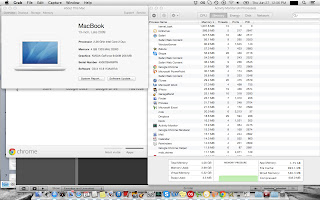
I tested OS X Mavericks more extensively over the last couple of days.  The Activity Monitor was always on (it has some wonderful new changes, by the way) and I was monitoring the changes.

I started loading a lot of apps so that I could overload the system and get the swap file to start slowing down the system.  But no...Nothing happened even after I loaded the heavyweights Chrome, Safari, and iPhoto.

So I went crazy and started opening up all the apps I had installed but the swap file refused to budge!  Compressed Memory apparently had started to come into play, and I could see its values start to rise.  Even after I had opened up all my apps, run a system scan with iAntivirus, playing iTunes in the background, and over 5GB of virtual memory used, the swap file was still ZERO.  Frigging Zero!!!!  Sure, the system was kind of bogged down, but I have never ever seen any OS with such fantastic memory management.  If it was Lion, Mountain Lion, or even Snow Leopard, the swap file would have been a few GB by now, and the system would be slow as molasses with the hard drive thrashing away!


I really really don’t know how Apple has managed this remarkable feat!  Even after continuing to stress the system for some more time, the swap file finally went up to 3.5 MB!!!  That’s MB not GB mind you....Amazingly Incredible!


If you look at the other picture I have included, it also shows the programs in App Nap, and this may have contributed to the memory management.  Maybe it puts the background apps to sleep and gives memory to those apps in the foreground.  The amazing thing is that all of this seems to be happening in RAM!

But whatever the reasons, whatever processes are going on, I just can’t believe the results.  I’m simply at a loss for words....